Realmost: A Script Font for Creative Projects
There I was, staring at a blank brand board, trying to find the right visual voice for a new boutique coffee shop. The client wanted something warm, approachable, and slightly playful. I had a few fonts in mind, but nothing felt quite right until I tried Realmost. It wasn’t just another script font—it had a personality that matched the vibe of the brand perfectly.
The Personality of Realmost
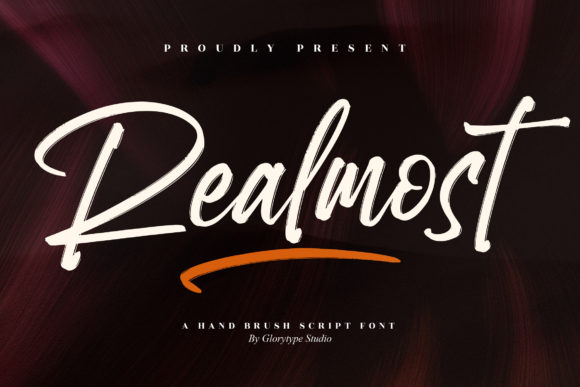
Realmost is a hand brush script font with a casual, organic feel. It’s not overly ornate or fussy, which makes it versatile for a range of design applications. The strokes have a natural variation, as if someone had used a brush to write it by hand. This gives it a friendly, human touch that can make a brand feel more authentic and relatable.
It’s ideal for projects that need a bit of character without being too loud. Whether you’re designing a logo, a packaging label, or a social media graphic, Realmost brings a sense of warmth and creativity. It doesn’t scream for attention, but it definitely stands out when needed.
Realworld Testing: From Logo to Packaging
I first tested Realmost on a logo concept for the coffee shop. The name was simple—just the shop’s name in a bold, clean typeface. But when I replaced the standard font with Realmost, it transformed the whole look. It added a softness that balanced the modern elements of the design. The script felt like it belonged there, like it had been written by the owner themselves.
Next, I placed it on a packaging mockup. The coffee bags had a minimalist design, with a small tagline and the shop’s name. Realmost worked beautifully here. It didn’t overpower the design, but it added enough flair to make the packaging feel unique. I also tried it on a business card. The font looked great at a small size, maintaining its legibility without losing its charm.
On a website header, Realmost made a strong statement. It was used for the main title, paired with a sans serif for the body text. The contrast between the two was effective, giving the site a fresh, modern look while still keeping the brand’s personality intact.
Where Realmost Shines
Realmost excels in display and headline roles. It’s not meant for long paragraphs of text, but as a logo font or a decorative element, it’s incredibly effective. It works well in branding projects where a personal, handwritten feel is desired. Think of it for a skincare line, a handmade shop, or a local bakery looking to add some character to their packaging.
It also pairs nicely with other fonts. I found that pairing it with a clean serif or sans serif typeface helped balance its more expressive nature. For example, using Realmost for a headline and a simple sans serif for subheadings created a cohesive and professional look.
When used in social media graphics, Realmost adds a nice touch to quotes, captions, and promotional posts. It feels like a natural fit for content that aims to be engaging and visually appealing. On an Instagram post, it stood out without being distracting, making the message more memorable.
Limitations and Considerations
While Realmost is great for many applications, it’s not ideal for every project. In formal or corporate settings, it might not convey the level of professionalism required. It also isn’t suitable for small text sizes where readability could become an issue. If you're working on a product label that needs to be read from a distance, a more legible font might be a better choice.
For long-form content, such as articles or brochures, Realmost would be impractical. Its style is best reserved for short phrases, headlines, or accents within a larger typographic system. That said, when used intentionally, it can add a unique and personal touch to any design.
Practical Tips for Using Realmost
If you're considering Realmost for your next project, it's a good idea to test it in different contexts before finalizing your design. Try it on a variety of surfaces—print, digital, and even signage—to see how it performs in real-world conditions. Pay attention to how it looks at different sizes and in different lighting environments.
Also, check the font’s available styles, ligatures, and alternates. These features can add more depth and flexibility to your design work. Make sure the font supports the languages you need, especially if your project has an international audience.
Finally, always verify the licensing terms before using Realmost in client work or commercial projects. Different licenses may apply depending on how the font is used, so it’s important to understand what you’re allowed to do with it.